Flex Routing for Microsoft 365 Copilot: Check your Tenant Settings Today

Last two weeks I was on vacation and I already read a lot about the Flex Routing Microsoft is enabling/disabling forced. While I was away, two distinct messages hit the Microsoft 365 Message Center that have caused a bit of a... nevermind.
Different messages where visible in the Microsoft 365 Message Center in the last weeks. MC1269223 (on April 4) suggests that Flex Routing is being enabled by default for EU tenants. On the other, MC1269219 (released on April 7) states it is turned off by default for these ones. But seeing it in the workfield, there seems to be no clear line on which tenants have received which message. It’s a good reminder that you should always verify your own settings rather than assuming the defaults.
What is Flex Routing for Copilot?
Flex Routing allows Microsoft 365 Copilot to be more flexible during peak hours. It gives Microsoft the ability to route your Copilot requests to the best available Large Language Model (LLM) infrastructure.
Essentially, if your local region is experiencing high demand, Flex Routing can send the request to a data center in another region to ensure you get a fast response. While this is great for performance and avoiding "system busy" messages, it raises immediate questions for those of us focused on Data Governance and Compliance.
The inconsistency between MC1269223 and MC1269219 highlights a common challenge in the Microsoft 365 ecosystem: there are differences for each tenant.
Why You Should Care (and Check)
If Flex Routing is enabled, your data might briefly process in a region outside your own. For many, the productivity gains of a faster Copilot are worth it. But for others, especially those in industries like finance or healthcare, this could be a dealbreaker if data leaves the EU Data Boundary.
How to Check Your Settings
You can manage this directly as an Global Administrator in your Microsoft 365 Tenant:
- Log in to the Microsoft 365 Admin Center.
- Navigate to Copilot > Settings.
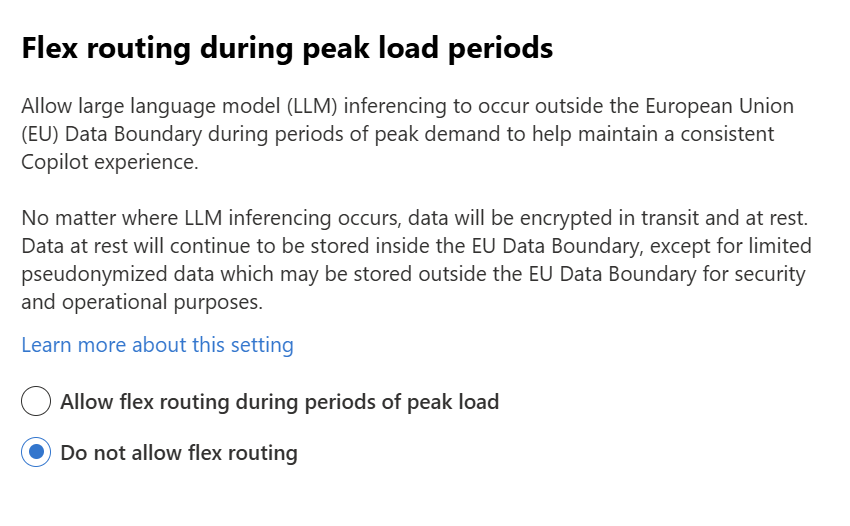
- Look for the setting Flex routing during peak load periods.
- Disable the setting by selecting Do not allow flex routing.
Final Thoughts
It’s great to see Microsoft offering more flexibility to keep Copilot fast and speedy, but the "forced" nature of these updates means we have to stay sharp. It's import to know exactly where your data is being processed is key to a successful AI adoption, and especially if you are active in the EU.
Keep reading
15 Sept 2026
Will Grok Be Available in Microsoft Copilot in the EU?
Microsoft is bringing Grok to Copilot, but the preview excludes the EU, EFTA and UK. Here is what the SpaceXAI subprocessor change means for IT.
11 Sept 2026
You Can Now Build Apps with Copilot Cowork and Copilot Studio
Have an idea for an internal app? Explore app building in Copilot Cowork and Copilot Studio, with a practical starter prompt and the checks IT should make first.
1 Sept 2026
Microsoft's Responsible AI Report: What You Still Need to Govern Yourself
Microsoft's 2026 Responsible AI Transparency Report explains its own governance work. Customers still need owners, approved use cases, evaluation and monitoring.
Comments
Loading comments…