A First Look at the New Security Dashboard for AI
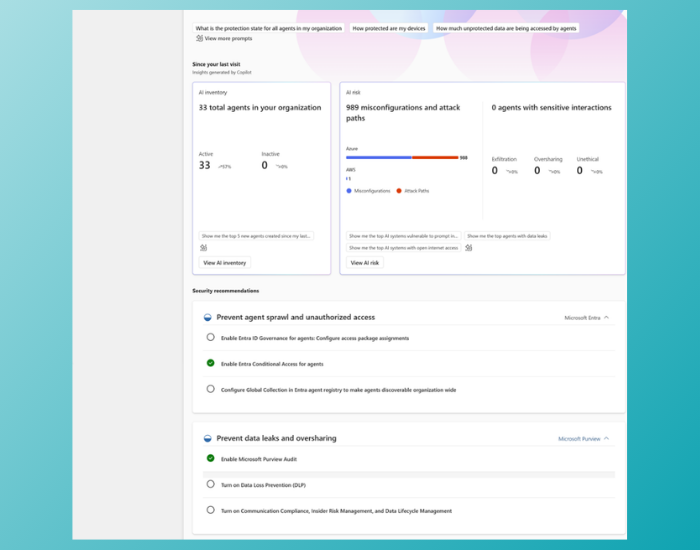
If you’ve been following my blog, you know I’m a big fan of Microsoft 365 Copilot and AI in particular. But as an IT professional, you also know that with all this possibilities, comes a whole new set of security headaches. How do you keep track of all those used AI in your company? Where are possible data leaks? And are your users using unmanaged "shadow" AI tools (okay, I just mean ChatGPT)?
Microsoft just dropped a solution to these questions: the Security Dashboard for AI is now in public preview. I’ve been diving into the documentation and testing the logic behind it, and honestly, this can help us as IT professionals really with governing AI.
The missing link for IT
Until now, managing AI risk felt like a game of Minesweeper I played a lot when internet was not a thing at home yet. You click a button, hope you don't find some hidden oversharing leak, and realize you have no idea where the next possible threat is hidden.
You’d check Microsoft Purview, Microsoft Entra for identity risks, and Microsoft Defender for app vulnerabilities. And maybe if you really want insights you're using SharePoint Advanced Management to see AI reports.
But for a CISO or a Security Admin, having three different portals makes it hard to see the "big picture." If a user is interacting with a third-party AI agent and sharing sensitive files, you need to see that all at once.
What is the Security Dashboard for AI?
The Security Dashboard for AI is a unified place that aggregates signals from all of them: Defender, Entra, and Purview. I already wrote about the DSPM portal and how this can help you, and this new portal will collect all of the info.
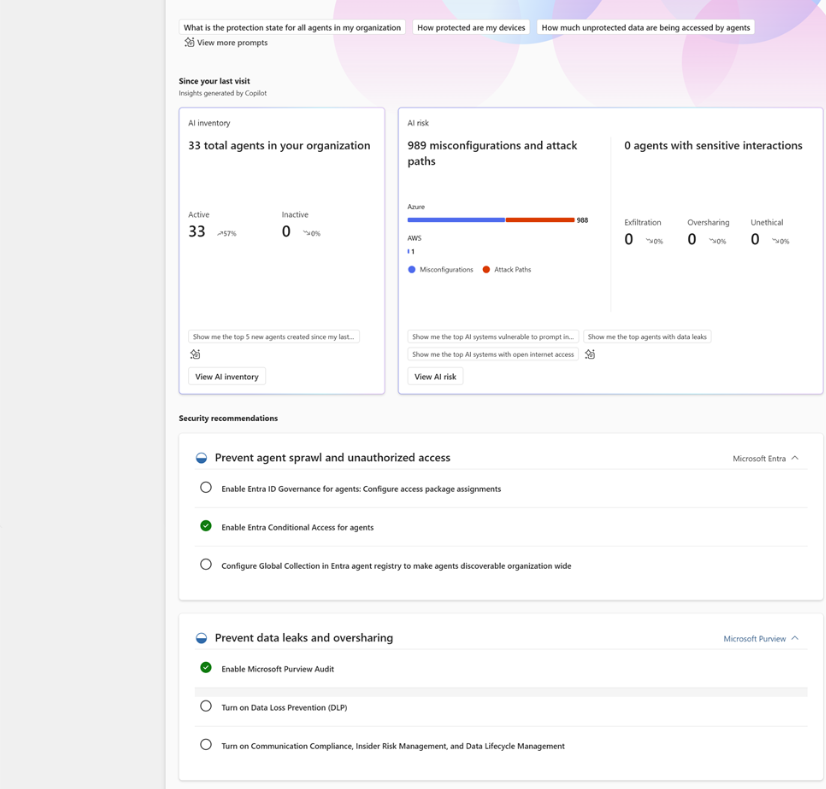
It’s designed to give you a real-time insight in the usage of AI in your organization, from Copilot to third-party AI apps. So it doesn't just focus on Microsofts own.
You will also gain insight in possible recommendations and remediations for your organization. This portal is a great tool for Information Managers or Security Officers to see how your environment can grow!
The Best Part: it's included
I’ll be honest: I expected this to be a new add-on or something, but it's not.
If you are already using Microsoft Defender, Entra, and Purview to secure your AI, you already have access to this. It’s included with the eligible security products you’re likely already paying for.
I’ve noticed some users reporting that it can take 24-48 hours for data to actually start showing up in the dashboard once you log in the first time.
Conclusion
The Security Dashboard for AI feels like Microsoft finally saying, "We hear you, no more clicking around in different portals".
By pulling identity, data, and app security into one spot, it makes AI governance feel much more manageable and also the graphs and insights will look good for management.
If you're rolling out Copilot (and especially if you're using the Frontier Program to test beta features), this dashboard should be your new home base.
Learn more:
- Official Microsoft Tech Community Announcement
- Step-by-Step Documentation on Microsoft Learn
- Access the dashboard directly at: ai.security.microsoft.com
Are you planning to use the Security Dashboard for AI? I’d love to hear your thoughts in the comments!
Keep reading
30 Jun 2026
How to Keep External Emails Out of Copilot Answers with Microsoft Purview
Purview adds a control for external email in Copilot grounding. Learn what it blocks, what it leaves alone and how to test the business impact.
3 Jun 2026
Your AI Agents Need Governance Too: What Agent 365 Changes for IT
An agent needs more than a useful prompt. The Build announcements make ownership, access and lifecycle management an important next step for IT.
20 Mar 2026
Microsoft 365 Copilot & The EU Data Boundary explained
As a Microsoft 365 engineer myself working in the Netherlands, I regularly get the question: "Is our data actually safe with Copilot?" The good news is that Microsoft has been very clear about this. With the Enterprise Data Protection...
Comments
Loading comments…